Delivery management software: a hands-on buying checklist
Choose delivery management software with six practical tests. Check order changes, driver actions, delivery proof and the records your office sees.
Delivery management software helps a business organize orders, assign delivery work, follow progress and keep a record of the outcome. For a business using its own drivers, the useful test is not how many features appear on the sales page. It is whether the office, driver and order source can follow the same delivery without losing important details.
Choose a shortlist that fits your operation, then ask each provider to demonstrate one ordinary order and a few realistic exceptions. This guide gives you five checkpoints and six test scenarios. Use them in a supported demonstration or test environment first, before connecting real customer messages, dispatch or payments.
Choose the right kind of delivery system
The category name is broad. A shop managing its own drivers needs a different workflow from an online seller choosing parcel carriers. Scurri describes a multi-carrier platform covering carrier selection, shipping labels and tracking. Patcho describes day-of delivery operations for big-and-bulky and retail fleets. Those are different starting points, even when both appear in a delivery-software search.
Write a one-sentence requirement before comparing names: “Our store receives orders from two sources, our own drivers deliver them, and the office needs the final status and proof.” Add your actual source, vehicle, item and receiving-window requirements. Do not assume that supporting ordinary parcels means supporting every specialist load or service.
A route planner mainly answers which stops to visit and in what order. A delivery system also needs to carry the work into the driver’s day and back to the office. Vehicle-maintenance software answers another set of questions. If stop sequencing is your only missing piece, our route-planner comparison covers that narrower choice.
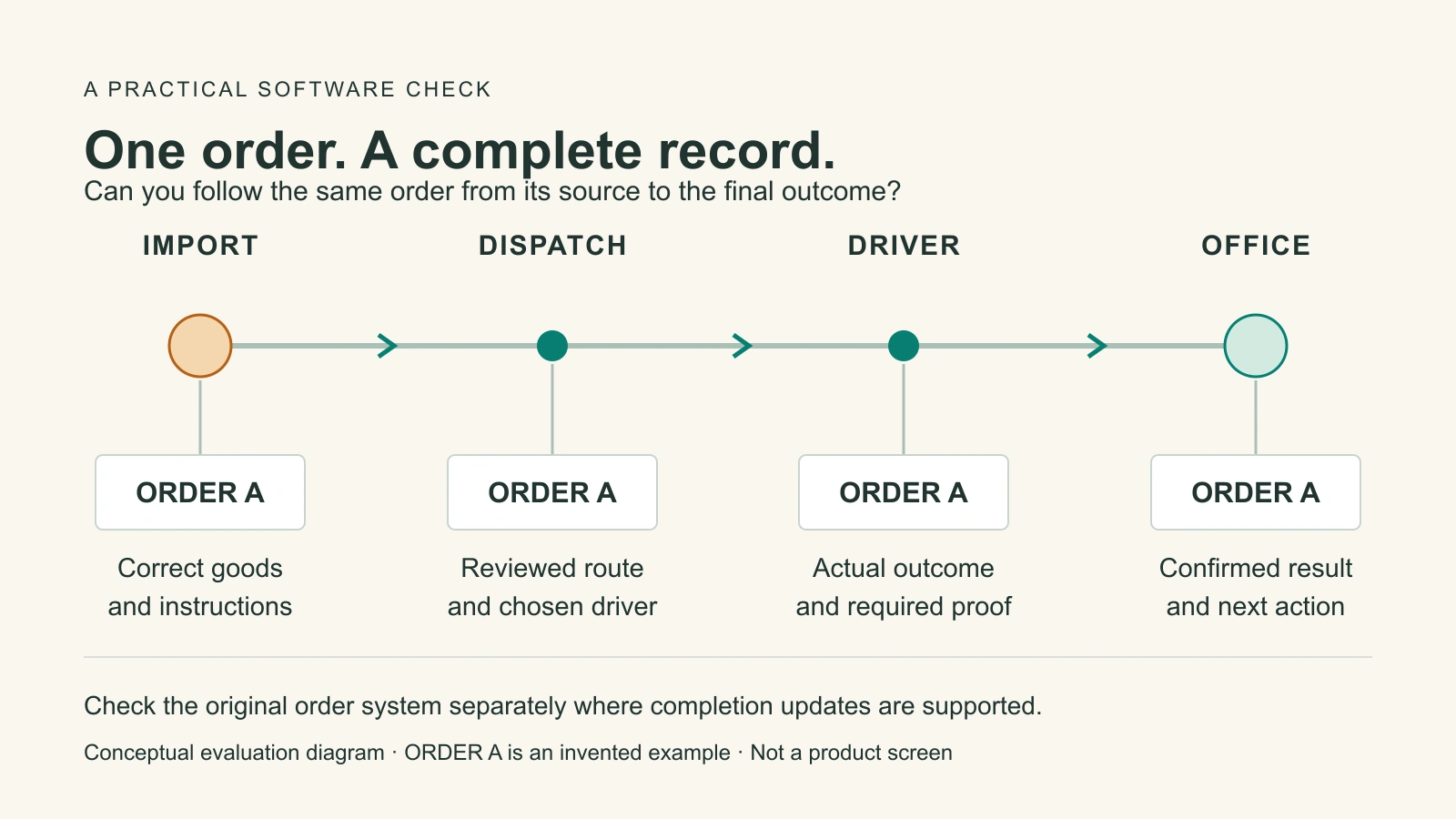
Follow one order through five checks
Use one recognizable example order from start to finish. In a demonstration, use invented details and a clearly marked sample. Ask the provider to show the actual workflow, not switch between unrelated screenshots. The order number, items and instructions should remain traceable even if the product groups several orders into one physical stop.
| Checkpoint | What to inspect | A useful passing result |
|---|---|---|
| Order arrives | Address, items, quantities and instructions | The delivery record matches the intended source order. |
| Route is approved | Driver, stop order and dispatch action | You can tell a prepared plan from work actually sent. |
| Driver opens the work | The exact stop, goods and access details | The driver can find the correct instructions on their normal phone. |
| Outcome is saved | Completion or failure, plus required evidence | The office can see the confirmed result and any remaining action. |
| Source is reconciled | The original system’s status, if connected | Supported updates arrive, or the remaining manual step is explicit. |
Keep a separate row for each system that must receive an update. A driver screen showing “delivered” does not establish that your store has also changed. Ask which connection performs that update, what happens if it fails and where staff can see work still waiting. Record the answer instead of assuming that an integration logo covers the whole process.
Ask for these six demonstrations
A polished ordinary delivery is necessary, but it does not expose every gap. Use the same scenarios for each shortlisted tool. Mark the result shown, needs follow-up or not supported, with a short note and the evidence you saw. An item on a future roadmap is not a feature you can rely on today.
- An ordinary delivery: follow the sample through import, review, dispatch, driver instructions and completion. Find the saved evidence afterward from the office view, without asking the driver to resend it.
- An order changes: change a sample quantity or instruction before dispatch in the supported test environment. Check which view receives the change and what review is needed. Ask separately what changes are allowed after work has started.
- The same input arrives twice: ask how the exact import method handles a repeated file or request. Does it recognize an existing order, create another one or require staff review? Do not assume all import methods behave alike.
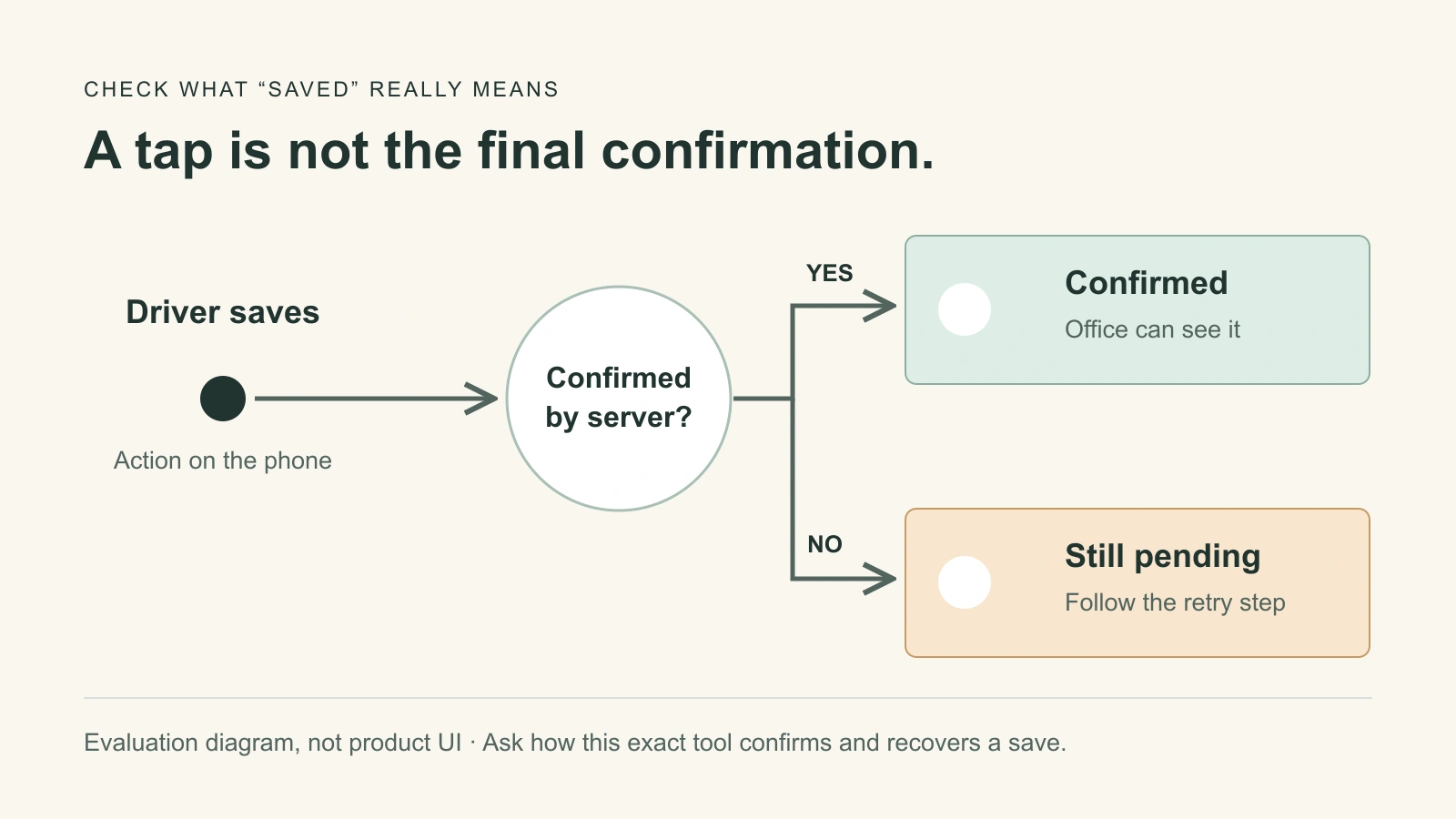
- The connection drops: ask which work can be saved on the phone, how pending items are marked and what happens when the connection returns. Verify that the office eventually sees one confirmed result, not an optimistic local message.
- The handoff fails: demonstrate an unavailable recipient or inaccessible entrance. Can the driver record the reason without falsely completing the order, and can the office find the goods’ status and next action?
- Only part of the order is completed: if this happens in your business, ask how remaining quantities, delivery evidence and source-system fulfillment are handled. A whole-order completion button is not enough to answer that question.
Let the dispatcher and a driver each perform their part while safely stationary. Someone who watches a specialist operate the tool may miss an unclear button or difficult recovery step. For regulated goods or special handling, add the checks your operation requires; this general checklist cannot establish suitability or compliance.
Make pending work and failures visible
Ask the provider to distinguish a tap, a saved local draft, a server-confirmed result and an update received by another system. They can happen at different times. The important question is what the person should do while a result is uncertain: wait, retry the same action or contact the office.
Test the meaning of notifications too. A message accepted by a sending service is not necessarily delivered to a recipient’s device. A tracking estimate is not proof of receipt. Our proof of delivery guide explains what photos, signatures and other records can establish. Choose the evidence your handoff needs and check that it remains retrievable after the route closes.
Compare the whole cost and the work left for staff
Use your ordinary month and a realistic busy month when asking for a quote. Check what is counted: drivers, vehicles, jobs, users or account tiers. Include required setup, connections, message usage, support and add-ons. Ask what happens when a limit is reached, and which needed functions belong to the quoted plan.
Price is also affected by the work the software leaves behind. If someone must copy every completion into a store, chase proof by phone or repair duplicate imports, record that effort. Do not invent a savings percentage: measure the current process, then compare the pilot using the same definitions and similar work.
DispatchTrack’s buying guide recommends starting from the process you want to improve. Apply that idea to your shortlist: name the problem, show the relevant workflow and note what remains manual. Also check how you retrieve or export your records if you stop using the service.
What the workflow looks like in Routella
Routella’s own-fleet delivery software is for a business managing its drivers. Orders can come from supported connections, manual entry or supported file imports. Imported orders can be reviewed before creation; preparing a route does not silently dispatch it. The dispatcher reviews the plan, chooses the driver and approves the route before it is saved and sent.
Drivers open their work through a browser link. The delivery page keeps order details and supported proof controls with the stop. Photos and a signature can record the handoff, while an unsuccessful attempt has a separate failure path. The screenshot below is a fresh capture of the actual public demonstration, not an invented interface or a completed customer delivery.
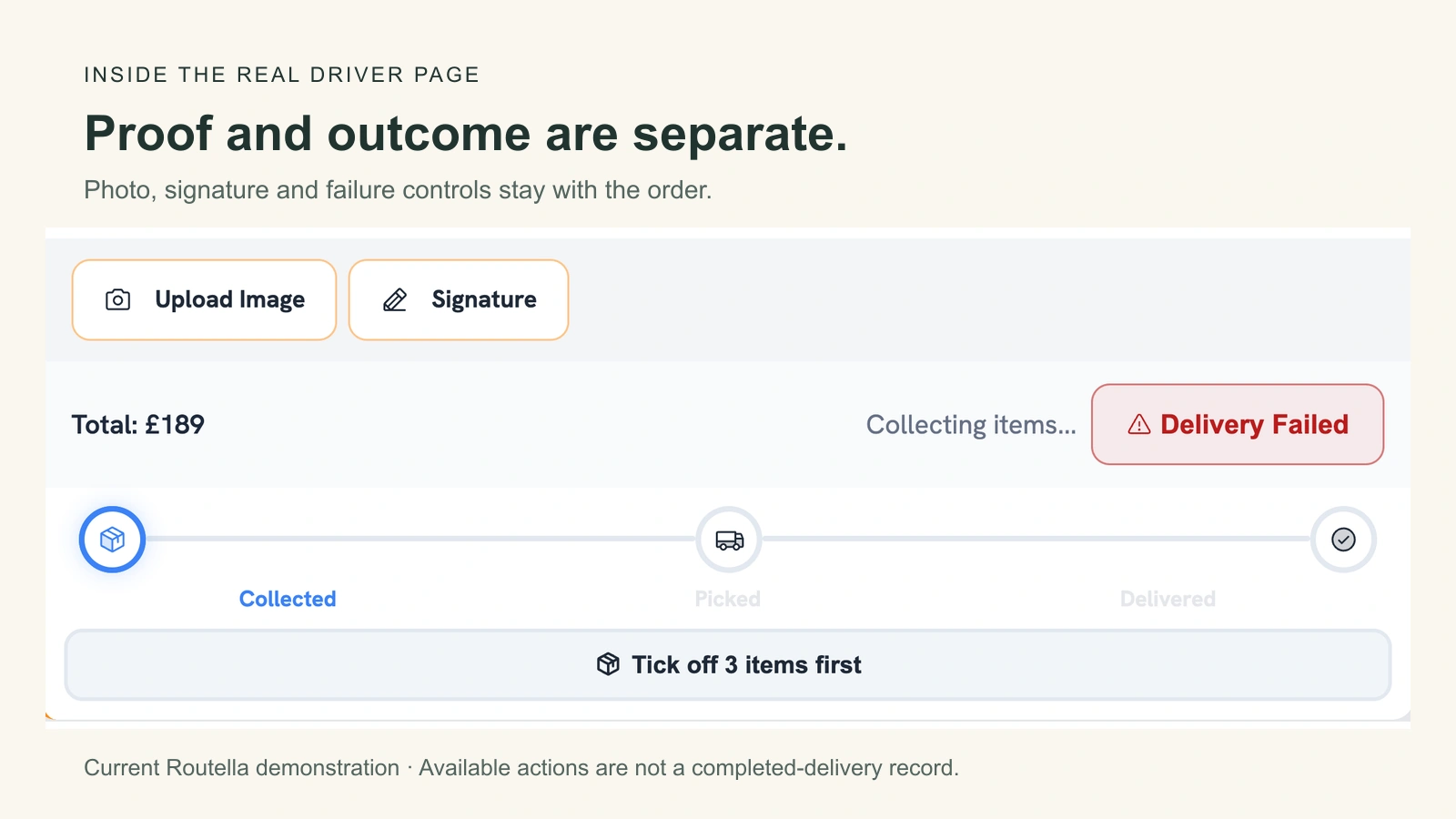
A proof photo waiting offline stays on that phone; completion still needs online confirmation. A confirmed completed stop is saved in Routella. Updating the original order system additionally depends on that official connection supporting completion writeback and having it enabled. Verify your exact source rather than assuming that all connected systems behave identically.
If you need independent delivery capacity instead of tools for drivers you already manage, Routella Partners is the separate marketplace path. Routella is not the participants’ employer. Account, service area, goods, vehicle and other applicable checks still apply, and signup does not guarantee a suitable driver or accepted delivery.
Run a small pilot before changing the whole operation
After the supported demonstration, choose a small set of ordinary, eligible deliveries for a planned live pilot. Agree who owns it, which drivers participate and who handles exceptions. Do not manufacture failed deliveries, duplicate customer orders or real charges to test recovery. Keep disruptive scenarios in the provider’s supported test environment.
Record the time staff spend preparing work, correcting details and finding outcomes. Count unresolved delivery records and missing required proof. Keep the workload and definitions clear; a quieter day is not evidence that new software made the team faster. Ask drivers which steps needed help and the office which questions it still could not answer.
Expand only when the essential tests have a clear answer and the team can handle the ordinary exceptions. An unsupported must-have is a reason to pause, not a detail to hide in a feature score. The right choice leaves your team able to say what happened to an order and what, if anything, still needs doing.
Frequently asked questions
Is delivery management software the same as a route planner?
Not necessarily. Route planning focuses on the order and journey between stops. Delivery management also covers the work around that plan, such as order intake, dispatch, driver instructions, outcome records and customer updates. Products overlap, so test the actual workflow rather than relying on the category name.
Does delivery software supply drivers?
Own-fleet software normally helps you manage drivers you already have; it does not create delivery capacity. A marketplace is a different service. Routella Partners connects eligible businesses and independent drivers, but account setup is not an accepted delivery or a guarantee of available work or drivers.
What should I check about offline use?
Ask which actions can be stored on the phone, how pending work is shown and how it reaches the office after reconnecting. Do not assume a photo saved locally means completion is confirmed. In Routella, proof waiting offline stays on that phone and completion needs an online confirmation.
How do I verify an order-system integration?
Use the exact connection and supported demonstration to check incoming details, changes, repeated inputs and completion updates. Confirm which fields move in each direction, what remains manual and how failures are reported. An integration logo does not establish that every workflow or update is supported.
How can I tell whether a software trial worked?
Choose the required scenarios and passing results before testing. Observe both the driver and office workflow, record unresolved work and compare similar deliveries using the same measures. Keep dangerous or disruptive tests out of live operations. An important unanswered question should remain open rather than count as a pass.
Bring your delivery workflow into Routella
Open setup with your real order source and driver workflow in mind. Review the orders and route before dispatching; signing in does not create or send a delivery.