Routing scheduling software: test the timetable, not just the map
Choose routing scheduling software using a worked route and a delay test. Check time windows, stop duration and manual changes before committing.
Routing scheduling software combines two decisions: which order to visit stops in, and when the driver can actually serve each one. Choose it by testing a timed route, not just admiring a tidy map. The plan needs realistic travel, time at the door, receiving windows and the limits of the driver’s working day.
For a business running its own drivers, a useful trial includes a small disruption. Add ten minutes at one stop, or move a stop manually, and inspect what happens afterward. This guide gives you a fictional three-stop exercise you can reproduce in a supported demonstration. It is not a claim that every product can solve every scheduling rule.
Match the tool to the work you actually schedule
A shared calendar records appointments. A route planner arranges journeys. A field-service system can also organize technicians, job skills and work that lasts much longer than a parcel handoff. These categories overlap, but they do not automatically solve the same problem.
For example, Jobber’s scheduling page emphasizes crew availability, calendar openings and drive time. OptimoRoute’s feature descriptions distinguish driver and vehicle requirements from order time windows and job duration. Read each provider’s own explanation, then identify the parts your delivery operation needs.
If your team already has a calendar, ask what is missing: arranging known stops, checking timed commitments, or carrying approved work into the driver’s day. Do not buy a larger system simply because its feature list is longer. Equally, a calendar that shows three appointments is not proof that one driver can reach all three.
This article focuses on evaluating that timetable. Our guide to designing delivery time windows covers how to choose the customer promise in the first place; the daily route-planning guide covers the wider preparation and dispatch process.
Give the schedule enough information to be meaningful
Before a demonstration, prepare a short set of invented orders that resembles your operation. Keep real customer details out of an unfamiliar trial account. Ask how the provider receives each field and what it does when a required value is missing.
- Start and finish: where the driver begins, when they can leave, and whether they must return somewhere afterward. A route that ends at the last customer can understate the working day.
- Receiving windows: when each location can receive goods. State whether the deadline applies to arrival, the start of service or the completed handoff; those are not interchangeable.
- Service time: the time for parking, access, unloading and the handoff. Use suitable assumptions for each stop rather than treating a loading dock and a reception desk as identical.
- Driver availability: shift boundaries, planned breaks and existing commitments. Ask which rules are actually enforced, merely displayed or left for the dispatcher to check.
- Load and vehicle fit: the actual packed goods, vehicle and handling requirements. A timed route is not evidence that the load fits or that specialist work is supported.
- Order relationships: goods must be collected before they can be delivered. Clarify whether several orders share one physical stop and whether a return is part of the plan.
Inspect the imported result before solving the route. A blank duration treated as zero can create an impressive-looking schedule that leaves no time to unload. Also check the date and local timezone, especially if orders arrive from more than one system. Correct inputs matter more than a polished animation.
Work through one short timetable
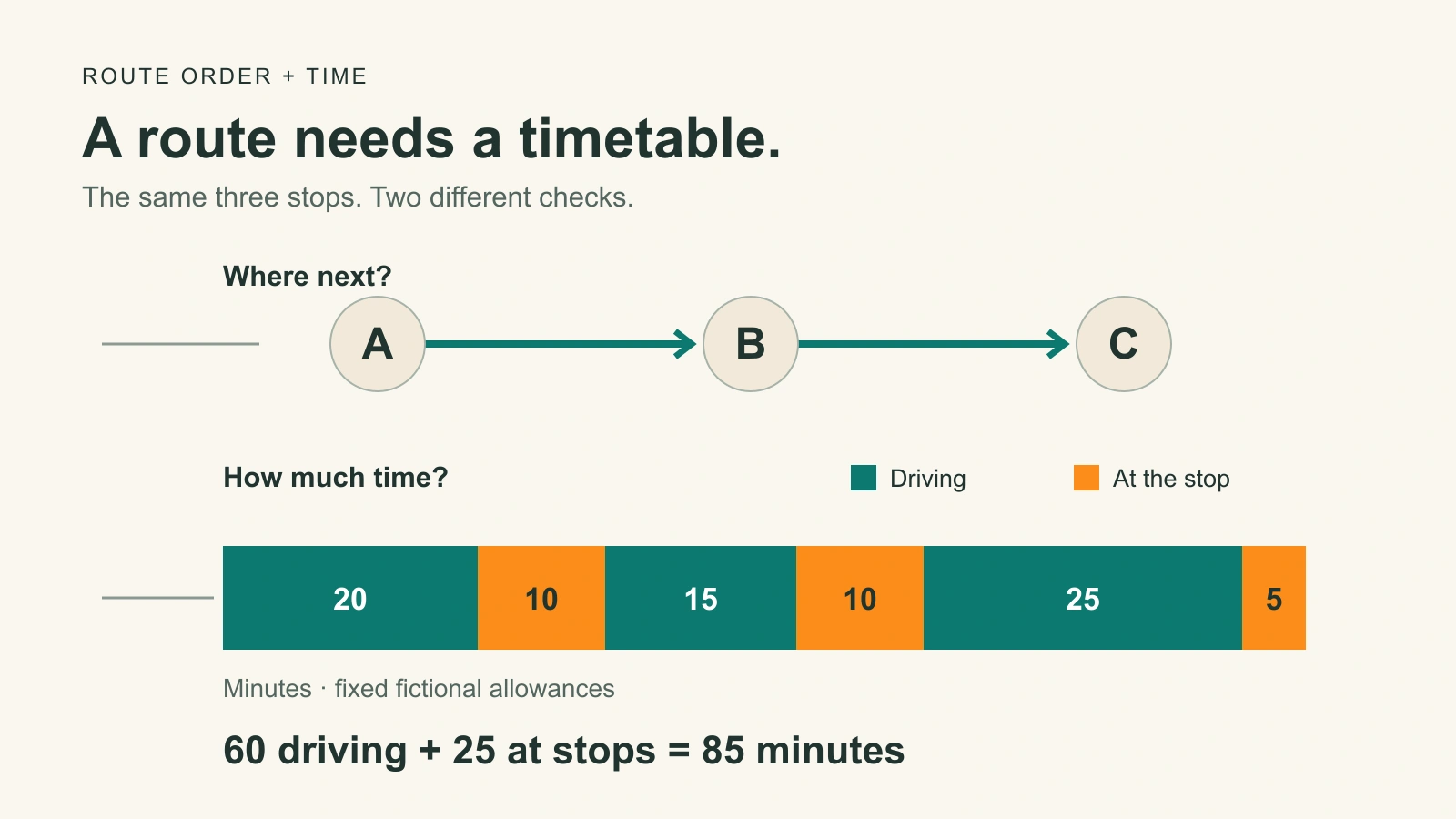
Here is a deliberately simple exercise. A driver leaves the depot at 09:00, visits A, B and C, and finishes at C. Travel times below are invented fixed allowances, not a live road estimate. The example excludes a return journey and assumes no extra waiting or breaks; add those if your real operation needs them.
| Stop | Travel from previous point | Arrival / service start | Time at stop | Leave |
|---|---|---|---|---|
| A | 20 minutes | 09:20 | 10 minutes | 09:30 |
| B | 15 minutes | 09:45 | 10 minutes | 09:55 |
| C | 25 minutes | 10:20 | 5 minutes | 10:25 |
For this exercise, B allows service to start from 09:30 through 09:50. The baseline starts at 09:45, leaving five minutes before that latest permitted start. Service ends at 09:55; that is acceptable under the example’s start-window rule. It would not meet a different rule requiring the entire handoff to finish by 09:50.
Ask the provider to show what its window fields mean rather than silently applying this interpretation. If it uses completion windows, enter the requirement that actually matches your business. The lesson is not that one definition is always better. It is that your team, the recipient and the software must mean the same thing.
Change one fact and check every affected stop
Now keep the visiting order and travel allowances unchanged, but increase A’s service time from ten to twenty minutes. The driver leaves A at 09:40, reaches B at 09:55 and finishes C at 10:35. B’s service starts five minutes after its 09:50 limit. The ten-minute delay consumed the five-minute margin and created five minutes of lateness.
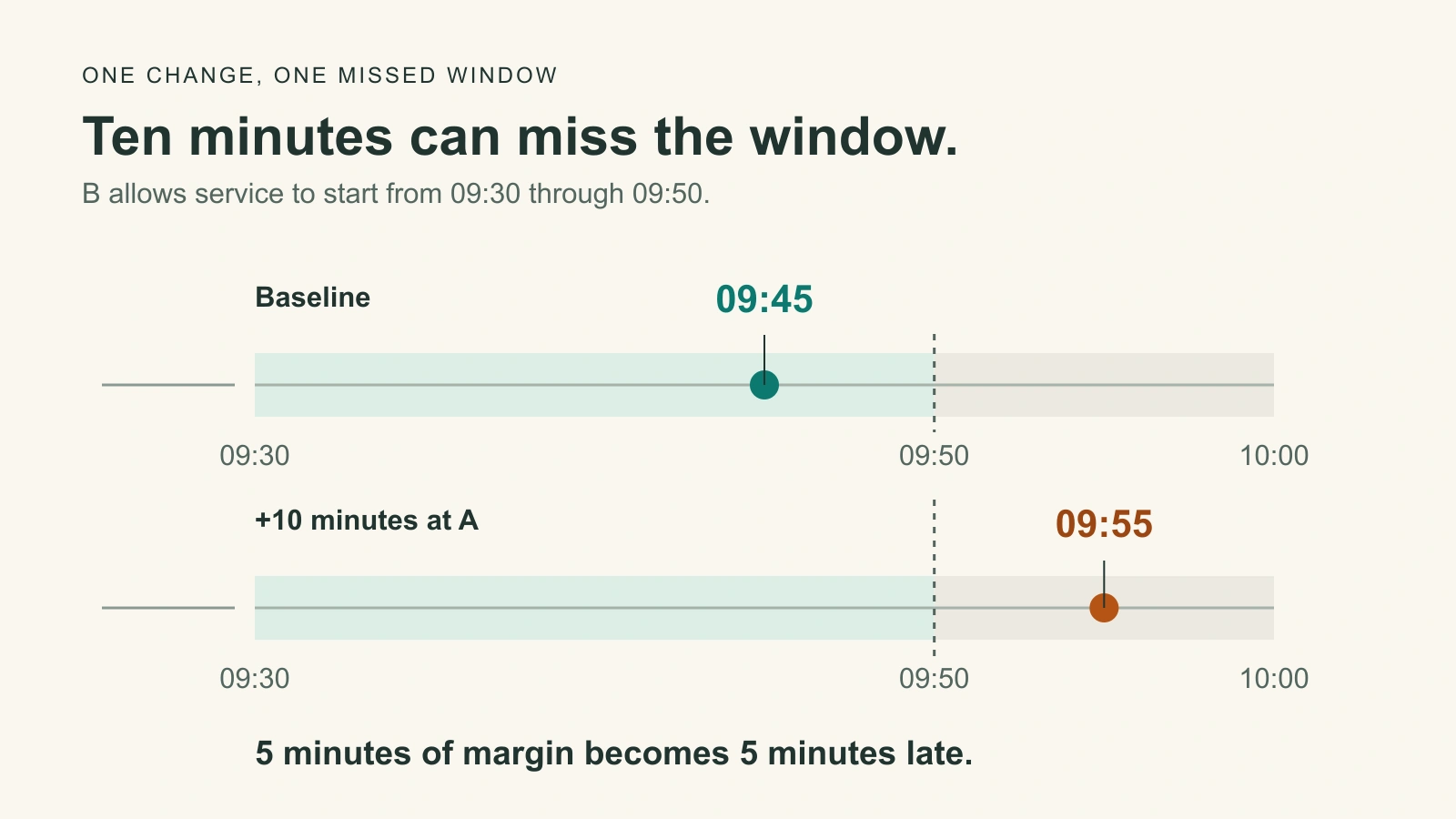
A useful demonstration makes this conflict understandable. The tool might flag the missed window, leave work unscheduled or offer another feasible plan. Ask which behavior you will actually see. Do not assume that drawing a different path automatically solves the problem, or that the program is allowed to move a customer’s deadline.
Next, make one supported manual edit in the demonstration and inspect the whole remaining route. Are arrival estimates recalculated? Is a conflict still visible? Do completed stops stay complete? Does the driver receive the reviewed order? Routific’s flexible-start guidance specifically notes that manual edits can introduce waiting, which is a good reason to test changes rather than trust the original result.
Keep disruptive experiments in the supported test environment. Do not move an actual customer delivery or send a false delay notice to see what happens. A small ordinary live pilot can follow once the dispatcher and driver understand the controls and the needed checks have passed.
Ask what happens when the work cannot fit
There may be no valid plan with the available driver, goods and promises. Software should help your team see that, not make the schedule look successful by quietly changing a limit. Ask which requirements are strict and which may be relaxed only with an appropriate decision.
Routific documents strict and flexible rules, including visible warnings for some allowed violations. That is one provider’s behavior, not a universal standard. In your shortlist, ask to see an impossible window and find the warning or unscheduled order yourself.
Do not relax a safety, vehicle or applicable working-time requirement to make a trial pass. If a customer can genuinely accept a different window, obtain the appropriate agreement first. Otherwise consider a different day, a different eligible driver or a separate suitable service. More software features cannot manufacture receiving time or available capacity.
Bring the reviewed plan into Routella
Routella’s route-planning tools are for businesses organizing their own drivers. Orders can enter through supported sources or manual entry. The dispatcher reviews the prepared route, chooses the driver and approves the work before it is saved and sent. Smart Routing adds live and predicted traffic to its planning; estimates still are not guarantees.
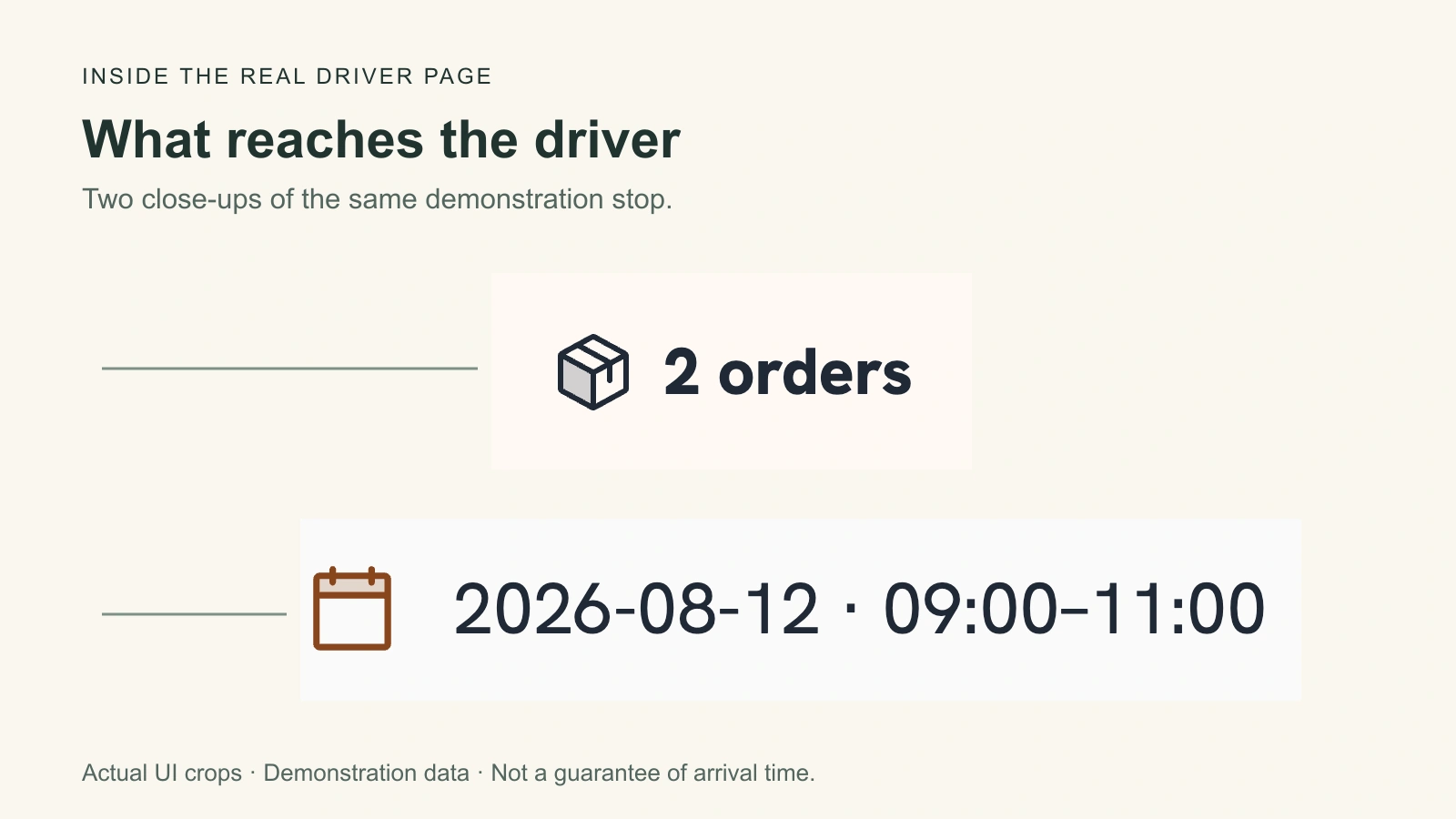
After dispatch, the driver opens a browser link with the stops and order details. The current demonstration below shows two example orders grouped at one physical destination, with a receiving window on the stop. This is why your evaluation should distinguish order count, physical stops and time needed at the door. Two orders do not necessarily mean two separate drives.
Routella supports manual route-order changes with updated route information. Test the timing behavior needed by your own workflow rather than assuming that every evaluation criterion above is an automatic Routella rule. Review the remaining stops after a change and check what the driver and customer will see before making a new promise.
If the missing piece is an independent driver rather than planning software, Routella Partners is the separate marketplace path. Routella is not the participants’ employer. Account, supported area, goods, vehicle, payment and other applicable checks still apply to the exact delivery, and available capacity or acceptance is not guaranteed.
Choose using the result you can explain
Keep a small scorecard for each shortlisted tool: inputs preserved, stop times understandable, impossible work visible, manual changes reflected and driver instructions clear. Record what was demonstrated and what still needs an answer. Do not count a roadmap promise or an unexplained screen as a pass.
The strongest choice lets the dispatcher explain why the route is workable, what changed and which commitment now needs attention. If the timetable only works because loading takes zero minutes or every customer accepts any arrival, repair the assumptions before comparing subscription prices. A slightly longer valid route can be more useful than the shortest route that misses the receiving window.
Frequently asked questions
What is the difference between routing and scheduling?
Routing determines the journey and visiting order. Scheduling adds when the driver can serve each stop, including travel, waiting, handling time and commitments. The functions often share one product, but a route line on a map does not establish that every customer window can be met.
Does a delivery time window mean arrival or completion?
It depends on the service and software. A window can constrain arrival, the start of service or the completed handoff. Ask which definition applies and enter the recipient’s actual requirement. A driver arriving before a deadline may still finish too late if completion is what was promised.
What should happen after a dispatcher manually moves a stop?
Check updated timing for the remaining route, any new conflicts and the instructions sent to the driver. Completed work should not become new work. Recalculation does not itself authorize a changed customer promise. Demonstrate the exact product behavior before relying on it during a busy day.
Is a shared calendar enough for delivery scheduling?
It can record appointments, but that does not mean it checks travel, time at stops, vehicle fit or relationships between pickups and deliveries. Start with the missing part of your workflow. If routes are simple, avoid unnecessary software; if constraints matter, ask to see how they are handled.
Does routing scheduling software provide drivers?
Software for an existing fleet helps plan the work of drivers you already manage. It does not create capacity. Routella Partners is a separate marketplace for eligible businesses and independent drivers, subject to account and exact-delivery checks. Signup does not guarantee a driver or an accepted delivery.
Bring your actual delivery day into Routella
Open setup with your order sources, receiving windows and driver workflow in mind. Review the route before dispatching; opening setup does not create or send a delivery.