Delivery Notification Templates: SMS, WhatsApp & Email Examples for Every Stage (2026)
Copy-paste delivery notification templates for every stage: confirmed, out for delivery, arriving soon, delivered and failed — for SMS, WhatsApp and email.
A delivery is not just the parcel arriving — it is a short series of small moments where the customer wonders what is happening. Every one of those moments is a message you either send or don’t. Send the right one at the right time and the delivery feels effortless and premium; send nothing and even a perfectly on-time drop generates worry, a support call, and sometimes a bad review. This guide gives you copy-paste delivery notification templates for every stage of a local delivery, across SMS, WhatsApp, and email — plus the handful of rules that decide whether they actually work.
These are written for businesses delivering with their own drivers — shops, florists, pharmacies, grocers, restaurants, and online stores doing local delivery — where you control the timing and can send a live tracking link. Take the templates, swap the [BRACKETED] fields for your merge tags, and match the tone to your brand.
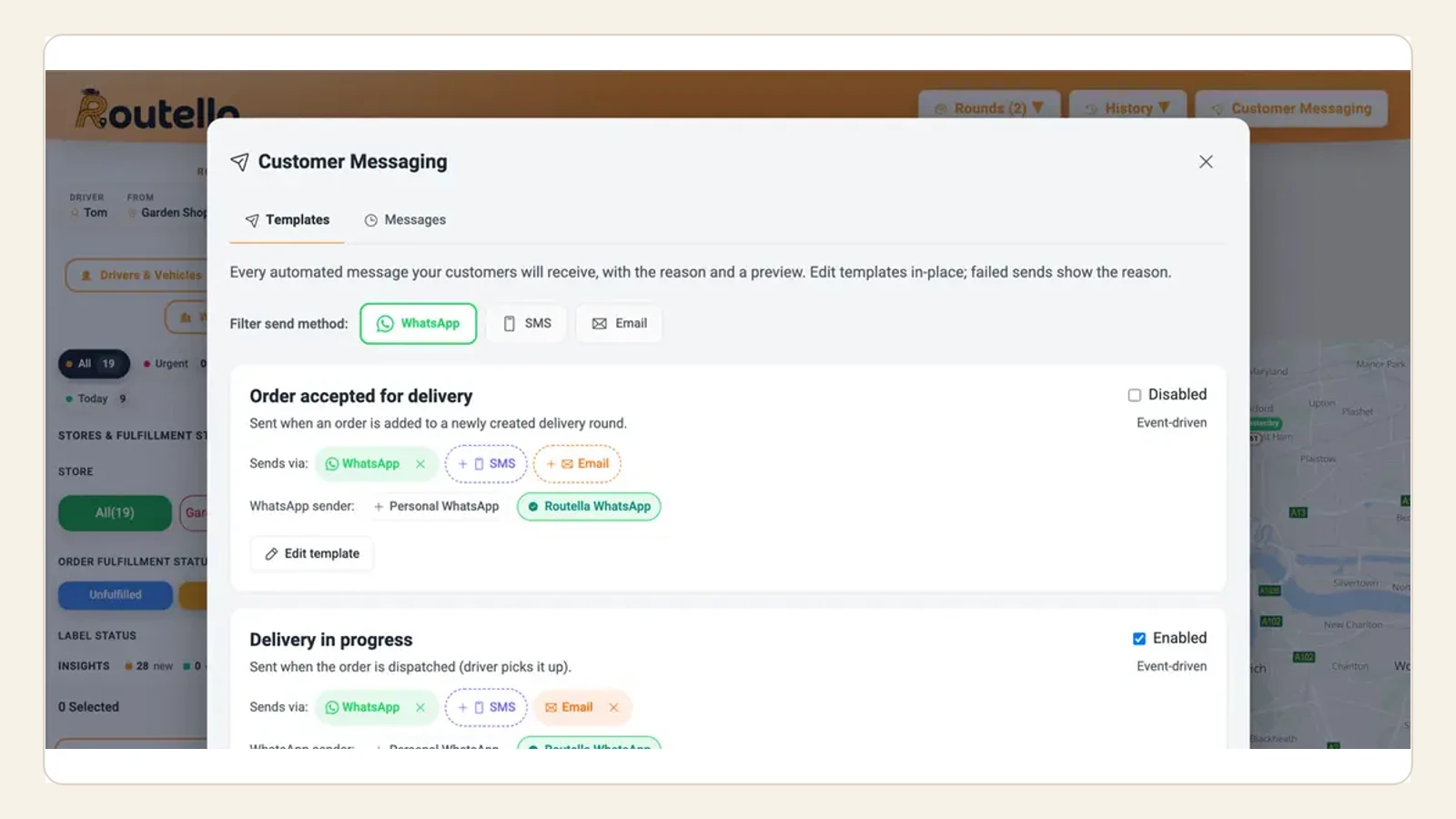
The five messages every delivery needs
You don’t need a dozen automated messages — you need five, each tied to a real event in the delivery. More than that becomes noise; fewer leaves gaps the customer fills with a phone call.
- Order confirmed — sent the moment the order lands, so the customer knows you have it and when to expect it.
- Out for delivery — sent when the round leaves, with a live tracking link and an ETA window. The single highest-impact message.
- Arriving soon — an optional short heads-up as the driver approaches, so someone is at the door on the first attempt.
- Delivered — a clean close with proof (photo/where it was left), which quietly ends most “it never arrived” disputes.
- Failed / rescheduled — the one nobody writes but everybody needs: what happened and the one thing the customer should do next.
For the strategy behind why each of these moves the needle — and which to prioritise if you only automate one — see our guide to customer delivery notifications. Below are the templates themselves.
1. Order confirmed
Send this instantly on order. Its job is reassurance and setting the expectation window, so the customer isn’t left wondering whether the order even went through.
- SMS: “Hi [FIRST_NAME], thanks for your order with [BUSINESS]! Order #[ORDER_NO] is confirmed and scheduled for delivery on [DATE]. We’ll text you a live tracking link when your driver sets off. — [BUSINESS]”
- WhatsApp: “Hi [FIRST_NAME] 👋 Your [BUSINESS] order #[ORDER_NO] is confirmed! 📦 Delivery is set for [DATE], [TIME_WINDOW]. We’ll send a live tracking link the moment your driver is on the way. Reply here anytime if you need to change your delivery details.”
- Email (subject + body): Subject — “Your [BUSINESS] order #[ORDER_NO] is confirmed”. Body — “Hi [FIRST_NAME], we’ve got your order and it’s scheduled for delivery on [DATE] between [TIME_WINDOW] to [ADDRESS]. You’ll receive a live tracking link when your driver heads out. Need to change anything? Reply to this email.”
2. Out for delivery (the one that matters most)
Send this when the round leaves your door, not at 6am. This is the message that stops the “where is my order?” calls, because it carries the two things the customer actually wants: a live tracking link and a realistic ETA window.
- SMS: “Hi [FIRST_NAME], your [BUSINESS] order #[ORDER_NO] is out for delivery and should arrive around [ETA_WINDOW]. Track your driver live: [TRACKING_LINK]”
- WhatsApp: “📦 On the way, [FIRST_NAME]! Your [BUSINESS] order #[ORDER_NO] is out for delivery, arriving around [ETA_WINDOW]. Follow your driver on the map here: [TRACKING_LINK] 🚚 Please make sure someone can receive it.”
- Email (subject + body): Subject — “Your order is out for delivery 🚚”. Body — “Hi [FIRST_NAME], good news — order #[ORDER_NO] has left with your driver and is expected around [ETA_WINDOW]. Watch it arrive in real time: [TRACKING_LINK]. If no one will be home, reply and we’ll sort an alternative.”
A tracking link is what turns this from a notification into a self-service answer — the customer watches the map instead of calling you. If you don’t yet offer one, read how a live tracking link with an ETA works and why it is the highest-leverage delivery feature you can add.
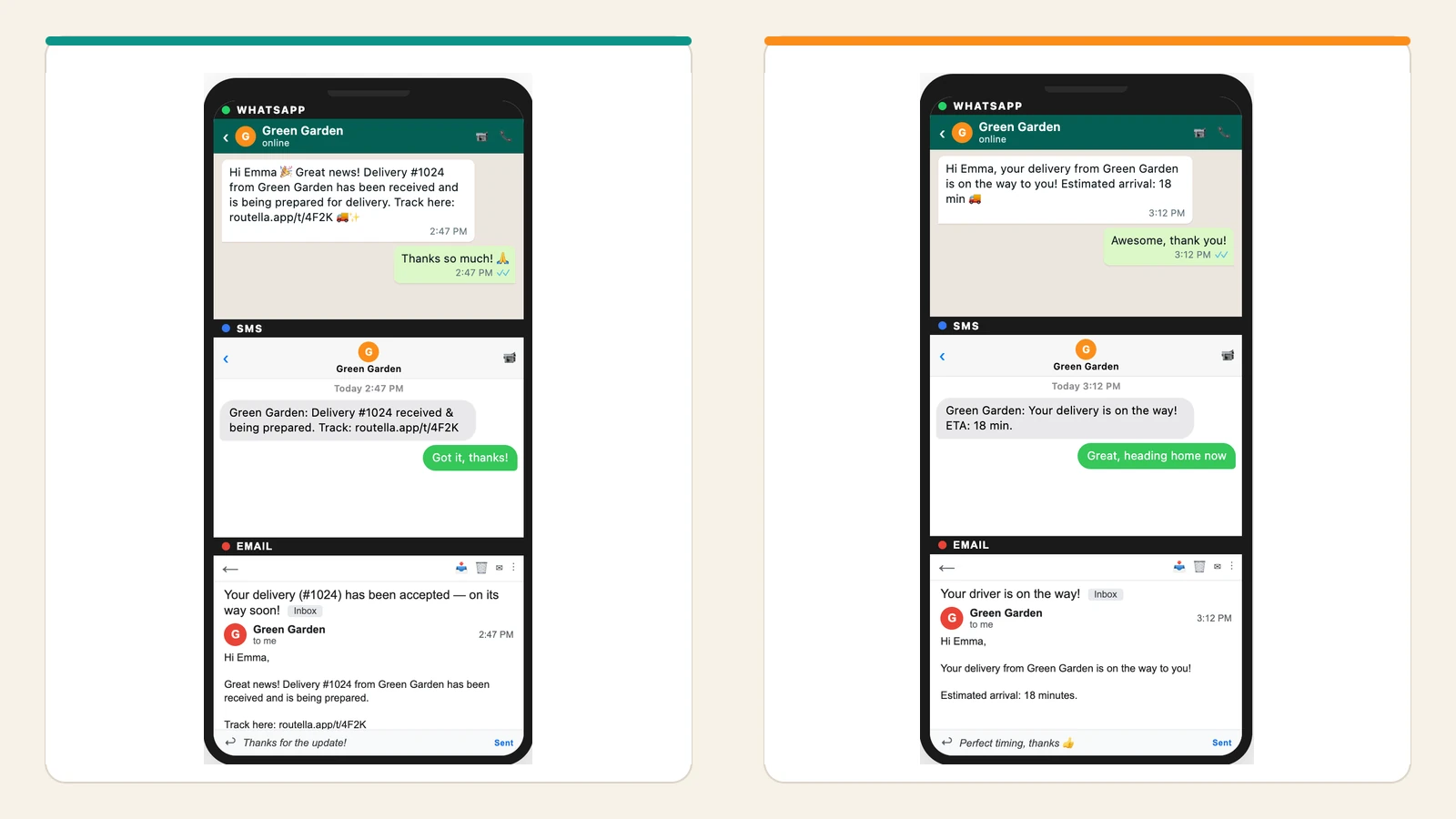
3. Arriving soon (optional but powerful)
A short heads-up when the driver is a stop or two away gets someone to the door on the first attempt — the cheapest way to avoid a failed delivery. Keep it to one line; the customer is about to hear the doorbell.
- SMS: “Hi [FIRST_NAME], your [BUSINESS] driver is nearly there — about [MINUTES] minutes away. See them approach: [TRACKING_LINK]”
- WhatsApp: “🔔 Almost there, [FIRST_NAME]! Your driver is ~[MINUTES] min away with order #[ORDER_NO]. Live map: [TRACKING_LINK]”
4. Delivered (close the loop with proof)
Sent the instant the driver marks the stop delivered. Beyond courtesy, this message is your first line of defence against disputes: pairing it with proof of delivery — a photo of where the parcel was left, or a signature — means “it never arrived” is answered by a link, not an argument.
- SMS: “Delivered ✅ Hi [FIRST_NAME], your [BUSINESS] order #[ORDER_NO] was delivered at [TIME]. Thanks for shopping with us!”
- WhatsApp: “✅ Delivered! Your [BUSINESS] order #[ORDER_NO] arrived at [TIME], [DROP_LOCATION e.g. “left in the porch”]. Here’s your proof of delivery: [POD_LINK]. Thank you, [FIRST_NAME]! 🙏”
- Email (subject + body): Subject — “Delivered: order #[ORDER_NO] ✅”. Body — “Hi [FIRST_NAME], your order was delivered at [TIME] to [DROP_LOCATION]. You can view the delivery photo and details here: [POD_LINK]. If anything isn’t right, just reply and we’ll make it right.”
This is also the natural moment to ask for a review or feedback — the experience is fresh and, if it went well, positive. Add one short line (“How did we do? [FEEDBACK_LINK]”) rather than a separate message a day later.
5. Failed delivery / rescheduled
The message almost nobody templates — and the one that saves the most goodwill. When a drop fails, the customer’s worry spikes; a fast, specific message with a single clear next step turns a bad moment into a handled one. Say what happened, and give exactly one action.
- SMS: “Hi [FIRST_NAME], we tried to deliver order #[ORDER_NO] at [TIME] but couldn’t complete it ([REASON e.g. “no one home”]). We’ll retry on [NEXT_DATE]. Reschedule or add instructions here: [RESCHEDULE_LINK]”
- WhatsApp: “Hi [FIRST_NAME], quick update on order #[ORDER_NO] — our driver couldn’t complete the delivery today ([REASON]). No problem: we’ll try again [NEXT_DATE]. Prefer a different day or a safe-place instruction? Just reply here and we’ll set it up. 🙂”
- Email (subject + body): Subject — “We missed you — let’s reschedule order #[ORDER_NO]”. Body — “Hi [FIRST_NAME], we attempted your delivery at [TIME] but couldn’t complete it ([REASON]). We’ll automatically retry on [NEXT_DATE]. To pick a different time or leave delivery instructions, use this link: [RESCHEDULE_LINK].”
A good failed-delivery message is the front end of a whole workflow — capturing the reason at the door, retrying, and preventing the same failure next time. That system is worth building on purpose; see how to handle a delivery exception.
SMS, WhatsApp, or email — which channel?
The best channel is the one your customer actually reads, and for local delivery that increasingly means WhatsApp. Rather than pick one forever, match the channel to the message:
- SMS — near-universal and read within minutes, with no app needed. Best for the time-critical messages (out for delivery, arriving soon) where you just need it seen. Watch length and per-message cost on long routes.
- WhatsApp — rich, two-way, and free-flowing for the customer, so it shines where a reply matters (reschedules, “leave it with a neighbour”, delivery-detail changes). Strong in markets where WhatsApp is the default messenger.
- Email — room for full detail, proof-of-delivery photos, and receipts. Best for confirmation and the delivered/proof message; too slow to read for “arriving soon”.
Six rules that make delivery notifications work
- Trigger on a real event, not a clock. “Out for delivery” means the round actually left — not a 6am batch. A message that doesn’t match reality erodes trust in all the others.
- Always carry the next answer. A tracking link, an ETA window, or a single action. A notification with nothing to tap is just an interruption.
- Give a window, not a false promise. “Around 2–4pm” beats a to-the-minute ETA you’ll miss. Under-promise on the window and let the live map do the precision.
- Personalise the essentials. First name, order number, and the specific address or drop location. Generic messages read as spam and get ignored.
- Match tone to brand and keep it short. A florist and a B2B parts supplier don’t sound the same — but both should be scannable in one glance.
- Deduplicate and respect quiet hours. One message per event, never a duplicate, and nothing at 5am. Localise language and timing if you deliver across regions.
Do these six well and the payoff is measurable: fewer inbound calls, higher first-attempt success, and a delivery that feels handled. If your support queue is full of status questions, that’s the symptom these messages cure — see how to reduce “where is my order?” tickets.
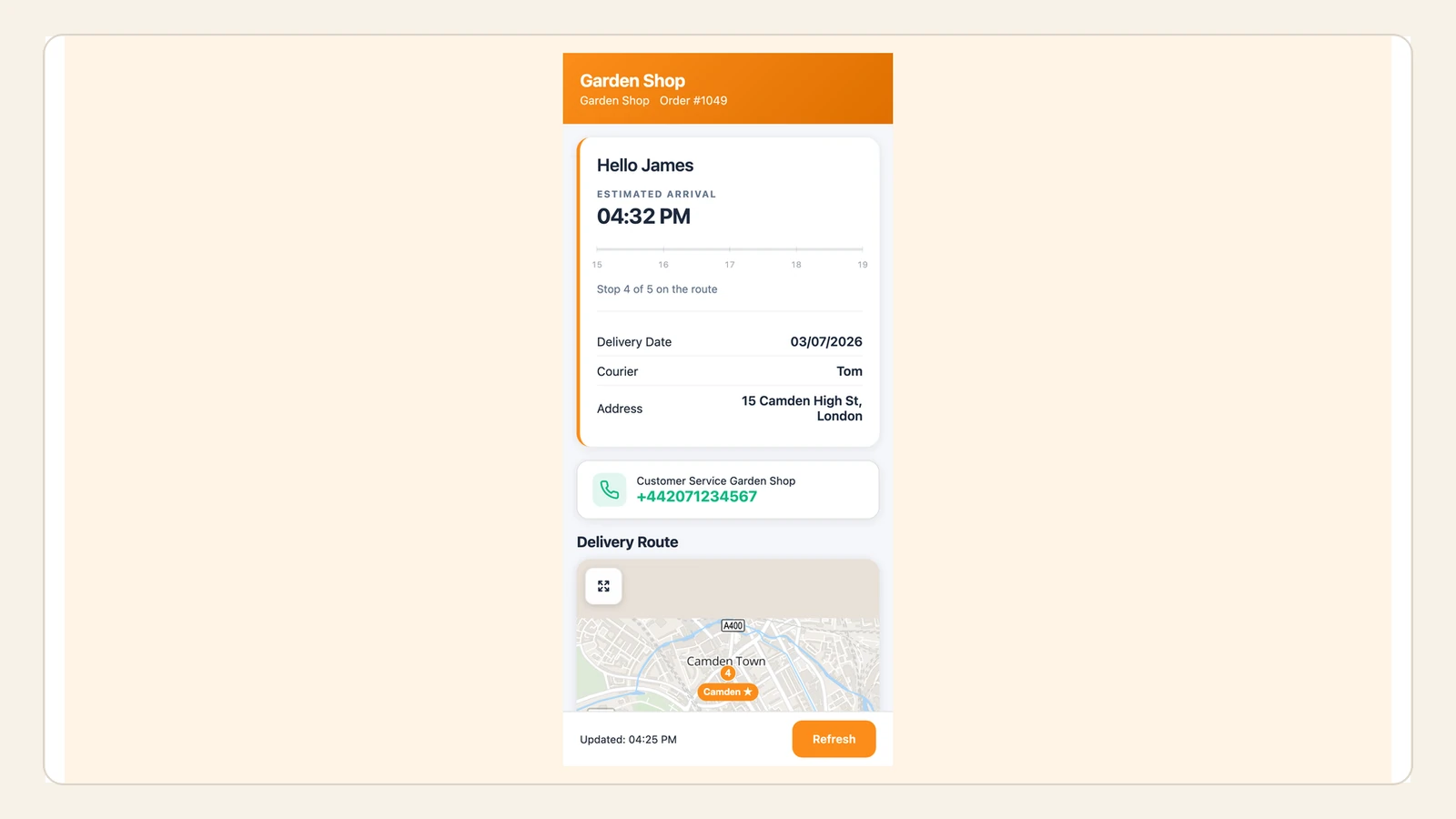
How Routella sends these automatically
Routella sends this whole sequence for you as event-driven automations — you don’t copy-paste anything at run time. When a round leaves, when a driver approaches, when a stop is marked delivered or failed, the matching message fires on the channel you choose (WhatsApp, SMS, or email), with the customer’s name, order details, a live tracking link and ETA, and — on the delivered message — the proof-of-delivery photo. Messages are deduplicated per event, and tracking pages localise into 195 languages, with SMS reaching 117 countries, so the same setup works whether you deliver on one street or across borders.
The bottom line
A great delivery experience is mostly a communication problem. Five well-timed messages — confirmed, out for delivery, arriving soon, delivered, and failed — each triggered by a real event and each carrying the customer’s next answer, turn a silent, anxiety-inducing wait into a delivery that feels premium. Steal the templates above, wire them to your delivery events, and pick the channel your customers actually read. To send them automatically alongside routing, a driver app, and proof of delivery, see how Routella works or start on the free plan. From here, dig into the strategy behind delivery notifications or how to cut “where is my order?” tickets for good.
Frequently asked questions
What should an “out for delivery” message say?
Keep it to three things: that the order is on the way, a realistic ETA window (a range like “around 2–4pm”, not a to-the-minute time), and a live tracking link so the customer can watch the driver instead of calling you. Add the first name and order number to make it feel personal. Example: “Hi Sam, your order #1024 is out for delivery and should arrive around 2–4pm. Track your driver live: [link]”.
How many delivery notifications should I send?
Five is the sweet spot, each tied to a real event: order confirmed, out for delivery, (optionally) arriving soon, delivered, and failed/rescheduled. Fewer than that leaves gaps the customer fills with a phone call; more becomes noise. Send each message once, and only when the event it describes has actually happened.
Should I use SMS, WhatsApp, or email for delivery updates?
Match the channel to the message. Use SMS or WhatsApp for the time-critical middle (out for delivery, arriving soon, failed) because they’re read within minutes; WhatsApp is especially good where a reply matters, like reschedules. Use email for the order confirmation and the delivered/proof message, where you have room for detail and a proof-of-delivery photo. Many businesses mix all three.
Do delivery notifications actually reduce support calls?
Yes — they’re the most reliable way to cut “where is my order?” contacts. Most of those calls are people asking where their order is and when it will arrive; an out-for-delivery message with a live tracking link and an ETA answers both before the customer picks up the phone. Pairing it with a delivered message that includes proof of delivery also heads off “it never arrived” disputes.
Can I automate these delivery messages instead of sending them by hand?
Yes. With a delivery platform like Routella, each message is an event-driven automation: it fires automatically when the round leaves, the driver approaches, or a stop is marked delivered or failed, on the channel you choose (WhatsApp, SMS, or email), with the customer’s details, a live tracking link, and proof of delivery filled in. You set the templates once; the system sends them at the right moment for every order.
Run your own deliveries with Routella
Route optimization, a driver app, proof of delivery, and live customer tracking — in one platform. Free plan, no credit card.